
Sonatype Nexus Repository 3.11 includes two new powerful features: Staging and Tagging. Together, these two features will let you build staged workflows for your components, and a lot more.
Why Staging?
If you're using a repository manager to share components between teams, you undoubtedly ask: how do I stop team A from using components made by team B before they're ready?
Modern build pipelines have many steps before components should be used in production, not just unit tests, but also system integration tests, regression tests, performance and scalability tests. Not to mention checking them over for transitive dependency vulnerabilities and license problems.
If these are mixed into a single hosted repository, how do you communicate which ones are ready for production?
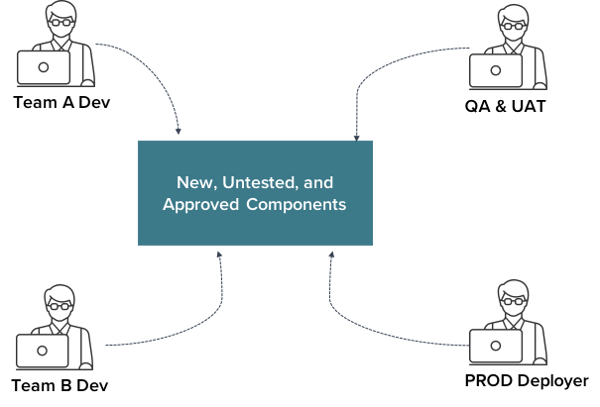
Unapproved components leaking into production can be a significant liability. How do you prevent this?
It's All About Access
Nexus Repository's Staging and Tagging features allow you to control the flow of components in a way that matches the structure of your pipeline. Here's how it works.
When new components are built, your CI/CD tool publishes them to the appropriate hosted repository for untested components. At the same time, they're tagged so they can be easily identified as all belonging to the same build.
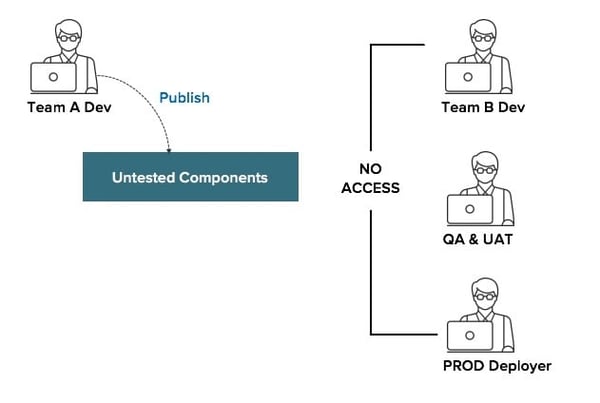
Using Nexus Repository's built-in access controls, you can choose who sees these untested components. Perhaps Team B can also publish to this same repository, but they can't consume Team A's components (using content selector permissions). Perhaps QA, UAT, and prod deployment users can't see any untested components at all.
Moving Along
When your build/approval processes reach the next step, a simple REST call orchestrated by your pipeline (e.g. Jenkins) moves the components to the next hosted repository in your staging pipeline.
Because the build's components were tagged together when they were first published, Nexus Repository lets you neatly find and move them all with a single call.

Once the components are in your 'Ready for UAT' repository, UAT deployment systems, QA users, or other approval mechanisms can now see the components and conduct their testing.
This example workflow is archetypal, but Nexus Repository doesn't attach semantics to these stages. You have complete flexibility to implement your staging workflows however you need.
Better Than Ever
If you are familiar with staging in Nexus Repository 2, you may notice this new approach is different. Instead of having hundreds or thousands of build-specific 'staging repositories,' all builds at the same stage coexist in the same hosted repository.
This ground-up redesign of staging has a lot of benefits:
-
More Scalable: Because all the components at a given stage live side-by-side in a single repository, we no longer need thousands of staging repositories to keep track of each build's components.
-
Not just Maven: Out of the gate, we have support for maven2, docker, npm, and raw formats, with support for more formats coming soon in additional releases.
-
More Flexible: Not only can you use these REST calls for staging, but because we've built this on a powerful "search and act" REST API, you can use the 'staging' calls for generic administration operations.
-
Long-lived: Unlike Nexus Repository 2-style staging repositories, tags outlive the final merge down to production. The days of hanging onto staging repositories so you don't lose build information are over.
-
Cleanup by stage: Since each stage is a hosted repository, you can apply different cleanup policies stage-by-stage. Abandoned builds could be aggressively tidied in early stages, while UAT and production builds are given much longer/indefinite retention periods.
But Wait, There's More
The tagging feature that we've shipped along with staging is powerful. Tags aren't just for grouping a build's components together.
Using the tagging REST endpoints, you can create arbitrary collections of components. Selecting components to tag is done using our search API. If you can search for it, you can tag it.
Not only are the collections flexible, but you can also add custom attributes to a tag's definition. Record build metadata (e.g. tools used, nodes involved, the initiating user or process), URLs to outside resources (e.g. manual approvals, bills of materials), or record custom state information (e.g. deployment history).
Tag associations are mutable, so you can include additional resources at any stage of your build process.
Getting Started
If you want to get started with staging and tagging, here are some resources:
-
Download Nexus Repository
-
Check out the REST endpoints using the Swagger UI built into Nexus Repository - find it at http://<your_nxrm>/#admin/system/api
Or watch this video to learn more:
What's Next for Staging?
This isn't the end of the road for staging, far from it. Over the coming months, we'll release staging plugins for Jenkins and Maven 2 to make it even easier to integrate staging into your build pipelines. We'll also be rolling out staging support for other great formats like Yum, NuGet, RubyGems, PyPI and others.
_Optimized.jpg?width=150&height=150&name=michael-prescott-bio-(1)_Optimized.jpg)
Michael is Director of Product for Sonatype Nexus Repository, where he helps make DevOps easy for software development organizations, large and small.
Explore All Posts by Michael PrescottTags

Try Nexus Repository Free Today
Sonatype Nexus Repository is the world’s most trusted artifact repository manager. Experience the difference and download Community Edition for free.