Nexus Professional

Features

Nexus Feature List

If you have any questions about Nexus please contact us. We have engineers (not just sales guys) ready to answer your questions.

Nexus Overview

Nexus Professional is the most widely used component repository manager for good reason. Key features include:

  • Procurement gives you control over the components you download
  • Repository Health Check provides security, license, and popularity data for your components
  • Build promotion and staging improves your deployment workflow
  • Robust architecture provides high availabllity to components under scale
  • Enterprise technical support
  • LDAP support and user token authentication for secure access control

Just click the categories on the left to explore dozens of other Nexus Pro features.

  • Ideal repo for complete component management

    A repository manager is a great starting place for managing components. But to get the most out of your components and your development teams, you need a complete governance solution that spans the entire software lifecycle. We provide a complete component governance solution in the Sonatype Component Lifecycle Management that supports the entire software lifecycle. This augments the repository-centric governance capabilities that are provided by Nexus Pro.

  • Discover & browse components via search

    Find the right components you need to optimize your development efforts. Nexus Pro lets you search by custom metadata, browse archives and view component dependencies.

    With OpenSearch, you can conveniently search for components from your browser's search bar. Our remote repository browsing feature coupled with Nexus Indexer support means that you can find remote components without having to login into remote repositories. You can also search public components locally without downloading the everything from the internet. Effectively developing component based software requires using the right components - components that can be trusted from a security, licensing and quality perspective. Nexus Pro provides the ability to identify and understand the right components from the start. Search by artifact metadata including GAV coordinates, class name or a class name pattern, checksum, or user defined metadata. View popularity and Sonatype Insight details as well as POM, Javadoc and file metadata component dependency details.

  • Procure the right components

    Control consumption of open source components using white and black lists to avoid quality, security, or licensing issues.

    Procuring the right components using a flexible approach can help ensure that your developers deliver software solutions that meet exacting quality and legal standards. Nexus Pro allows you to control the components that are consumed in your development environment through flexible inclusion or exclusion rules. This allows architecture types to review components before they make it into the final release - control necessary to ensure proper licensing with the option to dictate a specific version of software such as Hibernate or Spring. A procured release repository can be used to standardize the final release while still providing the flexibility for developers to add-in dependencies or work with other components earlier in the development lifecycle.

  • Repository Health Check

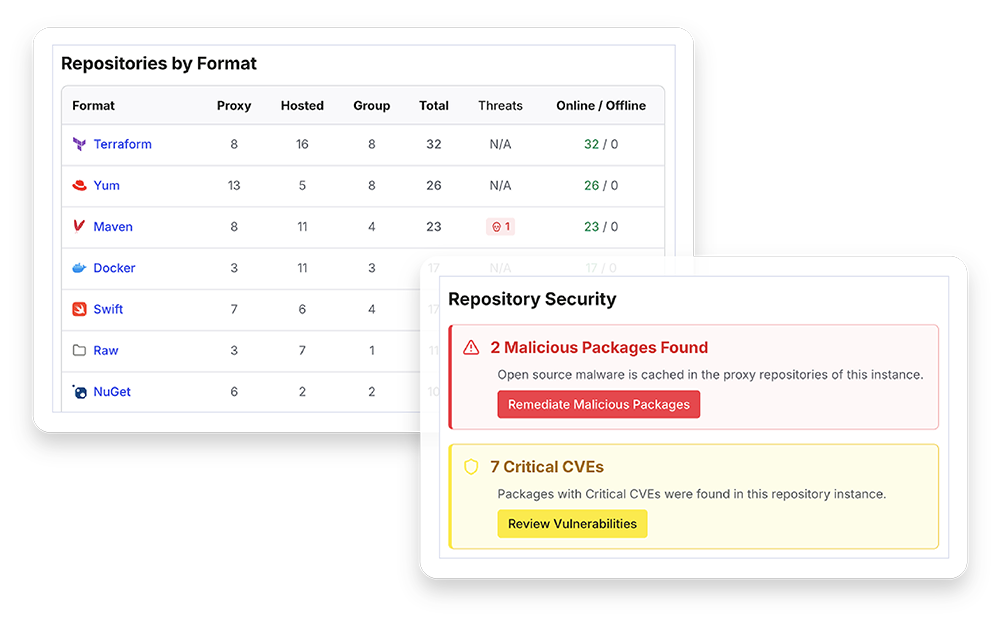
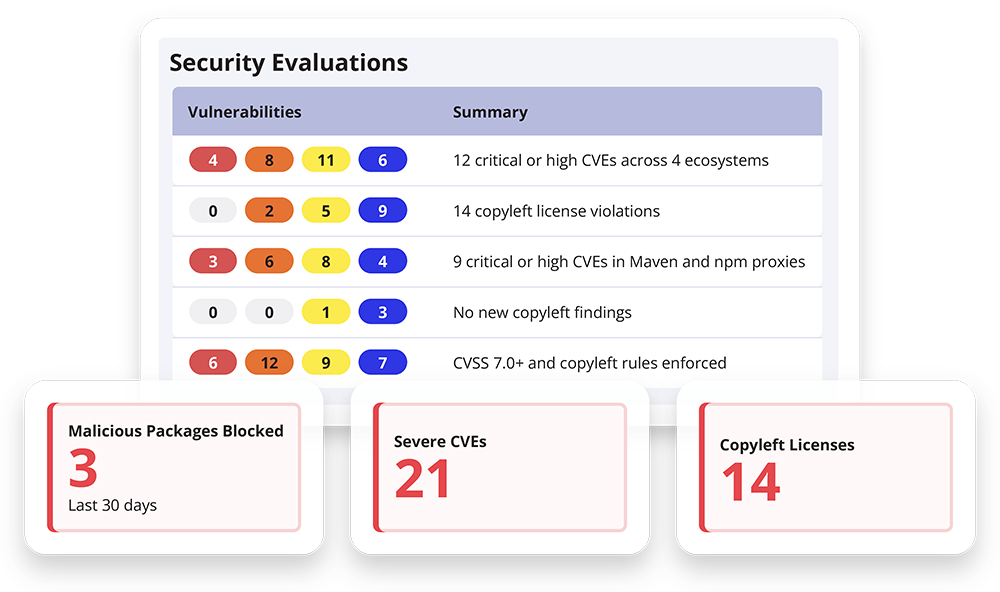
    Assess the components that your projects are using and avoid risks by reviewing popularity, license type and security vulnerabilities for every component in the repository.

    Software components and the environment in which they live are constantly changing - think about evolving security threats for one. Being able to assess the health of the components in your repository is critical, starting with an overview of the security and license alerts that exist in your repository and then drilling down into the individual components. This allows you to quickly see the breakdown of vulnerabilities based on severity and the threat level it poses to your repository. You can see the number of licenses detected by category and the number of conflicting licenses. Once you have the overall picture or your repository health, you can dig deeper for a comprehensive license and security analysis. This health assessment is critical since things are constantly changing - new threats are introduced, software components are revised and the deployment environment is far from static.

  • Build Promotion and Staging

    Ensure the quality of your production releases by managing your development processes with a controlled workflow through development, QA, to production.

    Establishing high quality software requires rigorous testing methodologies and an efficient process for managing the promotion of software through the dev, test, prod stages. The Nexus Professional Staging Suite provides the ability to create an isolated release candidate repository that can be discarded or promoted allowing you to certify a release. Nexus accomplishes this by creating a temporary staging repository that manages the promotion of artifacts from a staging repository to a release repository. Once the artifacts are added to the staging repository, QA or an administrative resource will be sent a notification. This allows a rigorous set of tests to be performed using the staging system and provides a natural decision point as to whether the staged environment should be discarded or promoted and used to generate the production system.

  • Hosted Repositories

    Easily share and publish components across the different constituents in your internal team.

    Hosted repositories provide the foundation for sharing and publishing components across your internal team. Nexus hosted repositories can be created and used to manage the components through the build, promotion and staging process. Nexus comes configured with hosted repositories that support releases, snapshots and 3rd parties. The release repository is where your organization publishes internal releases. The snapshot repository is use for internal snapshots that help manage the QA process. Nexus also supports 3rd-party dependencies for commercial, or proprietary licenses that are not available in the public Maven repositories. Support for hosted repositories provides the foundation for build promotion and staging and helps facilitate collaboration between the various development constituencies.

  • Proxy Repositories

    Reduce build times and keep even the largest teams in sync by collocating proxy servers with developers.

    Constant access to components is key for ensuring that developers can deliver software solutions on-time within budget. Nexus repository proxying allows local storage of open source components that are sourced from the Central Repository or other internet-based locations, speeding up builds and controlling access to components. Internal proxy repositories act as mirrors that can be located near the consuming developers, further reducing access time and providing greater availability. The proxy protects you from dependencies that have changed or are no longer available in remote repositories, and allows you to reduce your dependency on networks or internet access that can be slow or unreliable. While additional proxies can be created for ultimate flexibility, Nexus comes preconfigured with a Central Repository, Apache Snapshots and Codehaus Snapshots proxy repositories, reducing time to value.

  • Group Repositories

    Speed the development process by providing a single virtual location where developers access their components.

    Once you have decided which components should be used by your developers, you will want to make those components available to your developers in a seamless fashion. The last thing you want is for the developer to struggle with finding the location of the components. Nexus provides the concept of a group repository that allows you to expose the aggregated content of multiple proxy and hosted repositories with one URL to your developers using their favorite tools. Combining multiple repositories including external proxy repositories or hosted repositories that are setup for internal use provides a powerful feature that leads to greater developer productivity. Developers can access the correct components by leveraging a single URL shielding them from the potential complexity of multiple related repositories.

  • No Database

    Native file system support for repositories vs. an RDBMS simplifies backup and emergency access and eliminates the chance of lost artifacts related to database corruption.

    It is critical that you have a reliable, easy to maintain component storage mechanism that is not costly to maintain. Nexus leverages the native file system instead of relying on a relational database. This approach eliminates the need for a (potentially expensive) database license, the need to manage the RDBMS infrastructure and means that you don't have to worry about losing components due to potential database corruption. File system storage also means that you have direct access in emergency situations and can easily configure and run backups.

  • Settings Management

    Ensure developer and build consistency by using templates to easily share settings information across your team or a massive build grid.

    Everyone has lived through an experience where inaccurate configuration or settings have torpedoed or caused issues in the development process. Nexus eliminates this concern by using templates to properly establish and distribute Maven Settings. Without this capability, it is a constant challenge to keep everyone’s Maven Settings synchronized. This capability can be used if a Nexus administrator makes a change which requires every developer to modify his or her settings file, a change that impacts the entire organization. Nexus templates can also be used to share custom archetypes within your organization or to start up new projects quickly using a standard POM.settings.

  • REST-based integration

    Integrate Nexus capability into your organization using a REST-based services in whatever workflow or process that suits your organization.

    Sure, it's great to have a powerful user interface to drive Nexus with, but for many developers, it's all about automating capability directly in the tools and processes that are being used by their organization. To do this effectively, Nexus Pro provides a documented API that leverages REST. Every Nexus feature is exposed as a REST endpoint making it very easy to automate Nexus interactions in just about any language. For example, if you want to automate staging in Nexus from Gradle because you have a series of builds that need to be deployed to a staging URL, it is possible to automate the promotion of a repository from Gradle. This is one small example of what you can accomplish using the REST API - virtually any level of integration can be accomplished from any language or tool, providing great flexibility and extending the use of Nexus.

  • Fine Grained Security

    Protect your critical assets by partitioning repositories to permission individual sets of artifacts.

    Securing the repository, securing who can administer the server, securing who can access and deploy components is critical in today's development environments. Nexus makes this easy by providing a role-based access control (RBAC) which gives administrators very fine-grained control over who can read from a repository (or a subset of repositories), who can administer the server, and who can deploy to repositories. The security model in Nexus is also so flexible as to allow you to specify that only certain users or roles can deploy and manage artifacts in a specific repository under a specific groupId or asset class. With Nexus it is easy to create detailed security policies based on roles that can be implemented using standards-based tools.

  • Enterprise LDAP

    Support for multiple LDAP servers enables authentication failover.

    Nexus Pro extends the LDAP authentication features in Nexus OSS. Nexus Professional offers LDAP support features for enterprise LDAP deployments including the ability to cache authentication information, support for multiple LDAP servers and backup mirrors, the ability to test user logins, support for common user/group mapping templates, and the ability to support more than one schema across multiple servers.

  • Crowd

    Nexus can participate in a single sign-on and identity management implementation supported by Atlassian Crowd.

    Many organizations turn to Atlassian’s Crowd to implement a single sign-on and identity management system so they can consolidate user accounts and control which users and groups have access to which applications. Nexus Professional contains an optional security plugin that allows you to configure Nexus to authenticate against an Atlassian Crowd instance.

  • .NET

    Use Nexus as a single mechanism to manage all of your components including .NET components using Visual Studio NuGet support.

    Development environments are becoming increasingly heterogeneous - it's not unusual to see a mix of Java and .NET in almost any size organization. Leveraging Nexus as the common infrastructure for component management allows for consistency and helps facilitate integration and leverage of Java and .NET components. Nexus supports the NuGet repository format for hosted and proxy repositories. Nexus also supports aggregation of NuGet repositories and conversion of other repositories containing ".nupkg" artifacts to the NuGet format. This allows you to improve collaboration and control while speeding up .NET development facilitating open source libraries and sharing of internal artifacts across teams. When you standardize on a single repository for all your development and use it for internal artifacts as well you will get all the benefits of Nexus when working in the .NET architecture.

  • Maven

    Support for Maven from the inventors of Maven!

    Since we invented Maven, we clearly feel that Maven is the best tool for building and managing any Java-based project. Our opinion is backed by unquestionable market share and developer acceptance. Although Nexus works remarkably well with other alternatives, given our deep understanding and commitment to Maven, Nexus is optimized in virtually every way to work effectively with Maven. Nexus supports the ability the ability to host Maven repositories, which facilitates collaboration and encourages component re-use. Nexus is backwards compatible with Maven 1, 2 & 3, and converts Maven 1 to a format that is understood by Maven 2 clients.

  • OSGi

    OSGI component support via P2 or OBR repository standards.

    Organizations that leverage OSGI components using OBR or use the P2 repository format as a provisioning platform for Eclipse can turn to Sonatype for Nexus quality support. Nexus Professional supports the ability to create proxy repositories which can download OSGi bundles from remote OBR repositories. Nexus Professional can also act as a hosting platform for OSGi bundles, you can configure your builds to publish OSGi bundles to Nexus Professional, and then you can expose these bundle repositories to internal or external developers using Nexus Professional as a publishing and distribution platform. In much the same way, Nexus can supports the P2 Repository for those that use P2 repository format for provisioning Eclipse components. This comprehensive repository approach makes Nexus a "one stop shop" regardless of your preferred repository environment.

  • JRuby

    JRuby Gems support.

    Organizations that leverage RubyGems as the canonical store for Ruby OSS components can leverage Nexus via the JRuby Maven Plugin. As your've developing your Gems you can publish them to your hosted repositories using a custom Nexus Gem. This comprehensive repository approach makes Nexus a "one stop shop" regardless of your preferred repository environment.

  • Ivy / Gradle

    Ivy and Gradle support through the Maven layout.

    Just as Nexus is used to support environments that leverage Maven, development teams that rely on Ivy or Gradle can leverage Nexus to allow them to effectively manage their component lifecycle.

  • YUM

    Use RPM/YUM to deploy applications to your servers.

    Organizations that use Nexus to support their Yum repositories. Nexus can host the RPM packages and Yum clients can interact with the repository using the standard and familiar protocol. This comprehensive repository approach makes Nexus a "one stop shop" regardless of your preferred repository environment.

You have choices when it comes to repository managers, why choose Nexus?

  • 2 out of 3 Repository management users choose Nexus (more than 19,000 organizations)
  • Nexus offers critical features not found in any other repository manager
  • The world's largest companies run on Nexus
  • Sonatype created and operates Central, the world's largest repository of Java components supporting 7.5 Billion requests a year
  • All of major open source forges run on Nexus Professional including Central, Java.Net, Apache, Jboss, Atlassian, Codehaus
  • More than 4000 open source projects use Nexus Professional to release their components to Central
  • Nexus can scale to the most demanding workloads. Want proof? See how we support 2,500 requests per minute in a public production instance
  • Think Nexus is only for Apache Maven? Wrong. Nexus is the most popular repository manager with all build tools including Ant, Gradle, Maven, Ivy, and Scala

The company has been a pioneer in component-based software development since its founding by Jason van Zyl, the creator of the Apache Maven build management system and the Central Repository. Since that time, Sonatype has been a leader in core open-source software development ecosystem projects used by more than nine million developers including Nexus, m2eclipse, and Hudson.

Integration

Control Artifact Access and Deployment from a Single Location

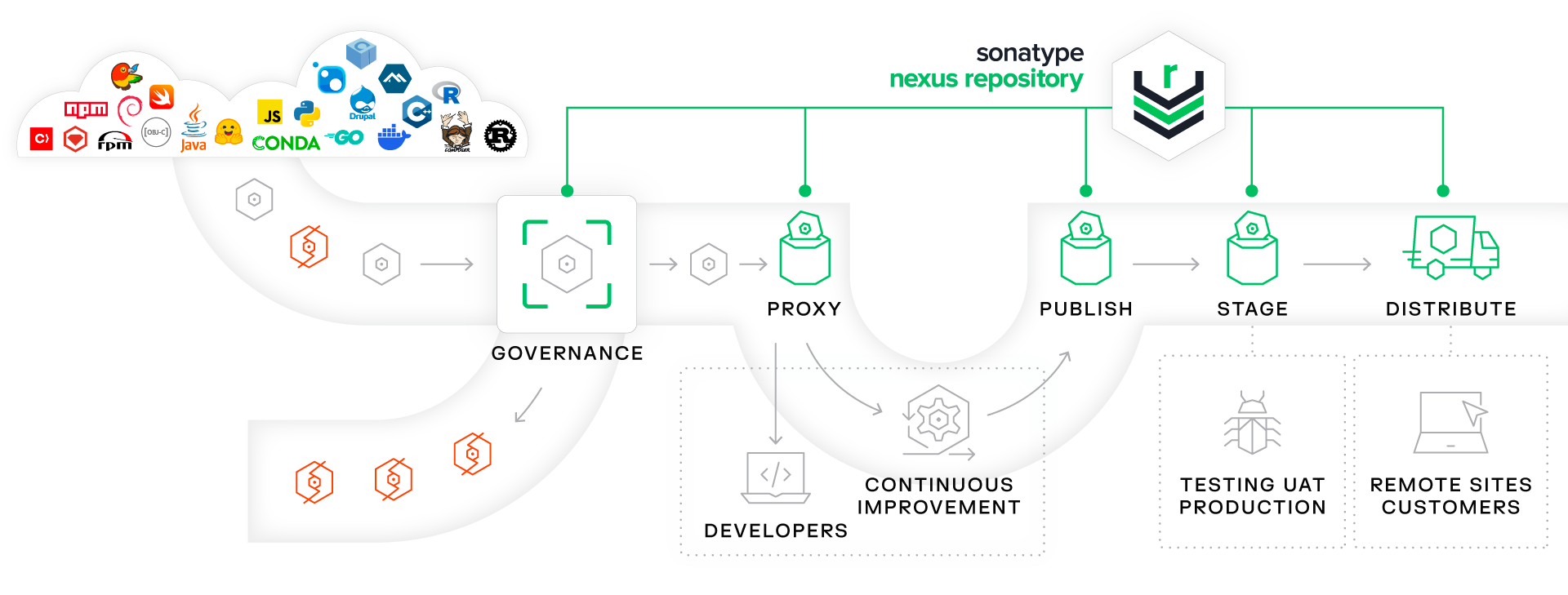
Nexus Professional is a central component of your development tooling that integrates directly with the IDE, the Central Repository, the build tool, and the provisioning tool as follows:

Tool Suite Infographic Nexus

Nexus Professional is also integrated with the Sonatype Component Lifecycle Management solution. The Sonatype CLM allows you to manage the components throughout the entire lifecycle and the Sonatype CLM is integrated with other repository managers, popular IDEs and CI tools.

  • IDE

    Developers can easily browse and select artifacts from any local or remote repository – all from within a familiar development environment. This saves times by reducing context switching and transcription errors.

  • The Central Repository

    This is a two-way integration, with Nexus both pulling and pushing artifacts to and from the Central Repository. The proxy function pulls allowed artifacts from remote repositories and stores them locally where they can be used by the build tool. This reduces build time greatly as large numbers of artifacts do not need to be downloaded with every build.

    On the other end of the development process, the Nexus build promotion features are used by many open source development organizations to control the pushing of completed artifacts back to the Central Repository for use by the community.

    Components that are downloaded from the Central Repository can be delivered via a secure connection using standard SSL. SSL support is the default configuration for Nexus Pro and Sonatype has extended support for SSL to other repository managers.

  • Build tool

    This is a two way integration, with the build tool, typically Apache Maven, both pulling artifacts from Nexus to satisfy dependencies and pushing newly created artifacts back to the local repository. Storing your artifacts in the Nexus repository encourages collaboration by making it simple for developers to share functionality without having to share source code.

  • Provisioning

    The provisioning tool will take finished applications, stored as binary artifacts in Nexus, and deploy them to servers. The build promotion feature is useful here as it can be used to control which artifacts are ready for deployment.

  • Component Lifecycle Management

    Nexus Professional is integrated with the Sonatype Component Lifecycle Management solution that manages components throughout the entire software lifecycle.

Awareness is Critical

Ignorance Isn't Always Bliss

Nexus Pro 2.0 identifies licensing, security and quality information about every component in your repo so that you can avoid problems.

  • Security Vulnerabilities

    Avoid risks by identifying components with known security vulnerabilities. Using data gathered from public and private sources, Nexus Pro 2.0 provides you with actionable information directly in your repo.

    • Get visibility early in the process and make informed decisions
    • Know if components have security flaws before they make it into your app
    • Learn of new security vulnerabilities as they are discovered
    View Sample Report
  • Licensing Information

    Do you know the licenses all the way down your dependency tree? With Nexus Pro 2.0 you can identify all licenses associated with each component, including those listed in both the POM and sources.

    • Proactively choose components for your projects based on security and license data
    • Avoid legal risks by identifying problematic licenses
    • Find hidden license conflicts that could compromise your ability to ship
    View Sample Report
  • Popularity Reporting

    Improve component selection using the wisdom of the crowd. The popularity report, based on downloads from the Central Repository tells you which components other developers are using.

    • Select the best components that have been used and tested by your peers
    • See if new versions with bug fixes or enhancements are available
    • Keep your repository up-to-date with the most used and tested components
  • Complete Component Lifecycle Management

    To get the most out of your components and your development teams, you need a complete governance solution that spans the entire software lifecycle. The Nexus repository provides an ideal starting point for a complete Component Lifecycle Management approach.

    Learn More
  • New in Nexus Pro

    Eliminate unplanned downtime with availability architecture. Host, proxy and standardize .NET packages in a single repository manager. Scale to support the largest deployments by pushing component update notifications from the master repository, with newly enhanced proxy functionality. Learn more here.

Repository Health Check

Take a Tour of a Detailed Repository Health Report

Take a tour a below to see how easy it is to identify specific components with known security vulnerabilities or unacceptable licenses. Just click through the report and if you missed a step or want to see one again simply refresh the page to start the tour over again.

Ready see what Nexus Pro can do for you? Check out all the new features and see what's new in 2.0.

Start Tour

Sample Nexus Repository Health Check Summary Panel
Sample Nexus Repository Health Check Security Vulnerabilities Panel Sample Nexus Repository Health Check License Analysis Panel
Sample Nexus Repository Health Check License Analysis Details
Sample Nexus Repository Health Check Component Lifecycle Management
  1. Summary Panel

    Get an overview of the artifacts that have been analyzed in the selected repository and the number of security and license alerts detected.

  2. Security Vulnerabilities

    Quickly see the breakdown of vulnerabilities based on severity and the threat level it poses to your repository.

  3. License Analysis

    See the number of licenses detected in each category and the number of conflicting licenses.

  4. Full Breakdown

    Dig deeper for a comprehensive license and security analysis.

  5. Component Lifecycle Management

    Sonatype provides a complete lifecycle management solution that spans the entire development process.

Not quite convinced?

Take Nexus Pro for a test spin and see the Repository Health Check in action.

Try Nexus Pro for Free

Ready to go Pro?

Make the upgrade to Nexus Pro and get control over your open source in your repo today.

Purchase a Nexus License